
Investing in security cameras for your home can be a costly endeavor. The hardware itself can be pricey, many cameras now require subscriptions for full functionality, and you’ll need to make sure your home Wi-Fi network is up to snuff as well. An easy way to avoid spending a small fortune on security cameras is to put the older devices you already own to work. Your old iPhone or Android phone still has a great camera — probably a better one than the cheap security camera you’re considering — and it can earn a new lease on life streaming live video.
All you need to do is download the free Alfred Camera app, and you can start using an aging device as a home security camera. It’s available on iOS and Android, and there’s also a web client for viewing video streams on any device. Though there are a few limitations to using the free version, it’s still a no-brainer if you already have the hardware lying around.
Everything you can do with Alfred Camera
Live viewing, motion detection, and local recording are all free
A major reason for Alfred Camera’s universal appeal is its cross-platform support. It’s available on iPhones and Android phones, and requires either iOS 12 or Android 5 or later. In other words, Alfred Camera supports really old devices, and any phone you have in a junk drawer should work. You can either stream live camera feeds from another phone or via the Alfred WebViewer, so you have plenty of options.
The basic free tier of Alfred is quite generous. It offers live video streaming, motion detection, and local recording of detected events. This means the Alfred Camera app can stream live to your other devices, detect motion in your environment, and save 30-second video clips completely free. There’s also a continuous recording option that loops, storing footage on your device and overwriting the oldest files after eight hours.
Subscribing to the optional Premium tier offers a few benefits, like HD streaming, AI person detection, cloud storage, watermark removal, and timestamps. To me, those aren’t necessary for a basic security camera. The free version of Alfred should cover your essential needs and then some.
Any time you use an internet-connected camera, consider what it can see and the things you are streaming to protect your privacy. However, Alfred uses 256-bit AES encryption for security.
It literally takes seconds to set up Alfred Camera
Just create an account and start streaming live video
The setup process is seamless. All you need to do is download the Alfred Camera app on your host device and your client device — that’s your old and new smartphone. It’s easy to create an account using the Apple and Google ones you already have, or you can create a new one for Alfred. After following the prompts to enable the required app permissions, you’ll be able to start streaming.
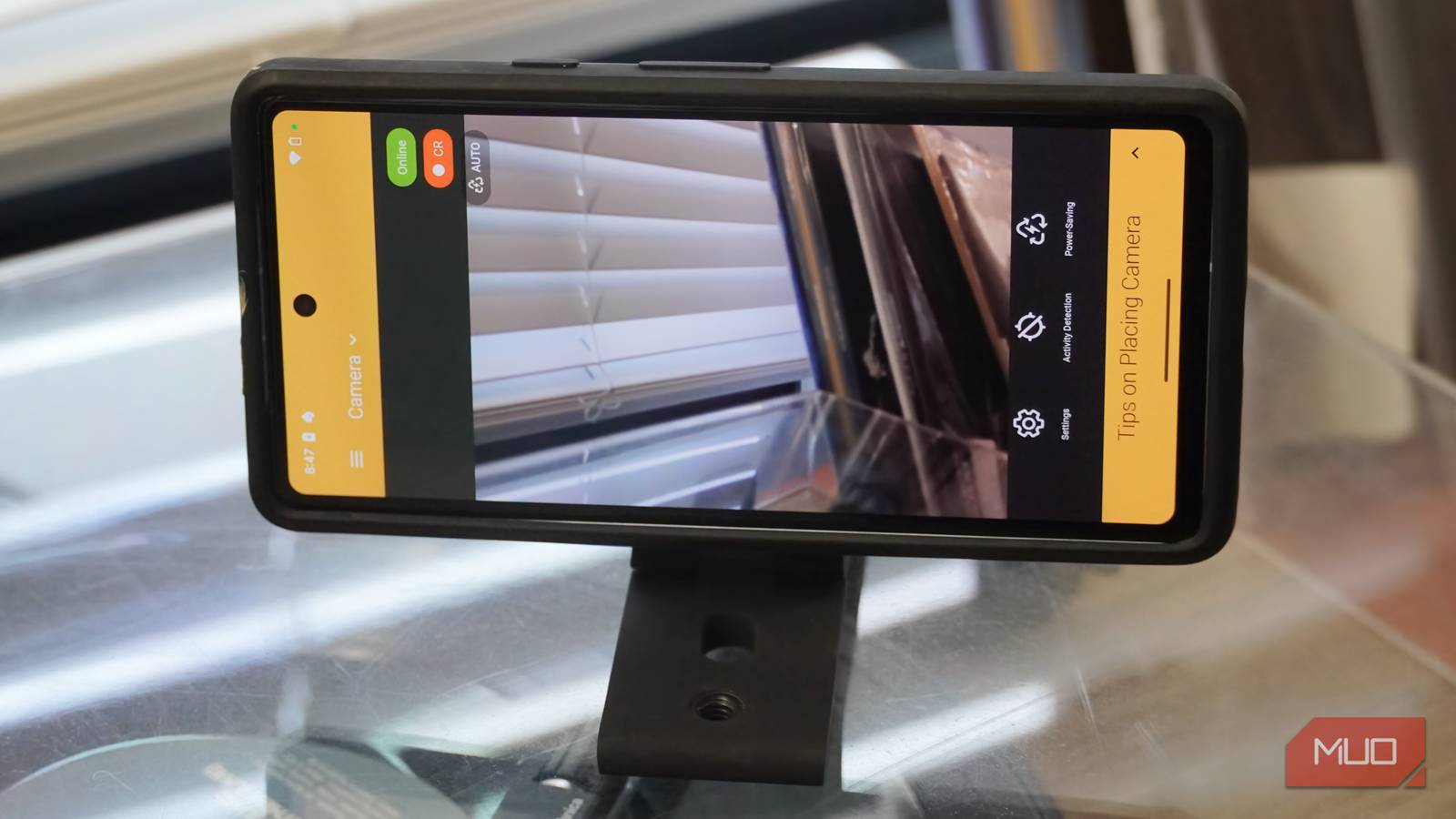
Users can log into the Alfred Camera app on another device, using the same account, to stream your old phone’s camera feed. On the device that’s recording, you can manage settings, motion detection, and activate power-saving mode. Using another device, you can stream the live view, start recording, and use your phones to broadcast audio messages.

Using a mobile phone stand certainly helps to get the right angle, but it’s not required. If you have a kickstand case, wallet stand, or similar gadget, you can use it to position your old phone as a security camera.

4 cheap gadgets that make an Android phone a real laptop replacement
You can use your phone as a laptop alternative in a pinch with a few simple (and cheap!) accessories.
Your old phone’s camera is incredibly sharp
It’s cheaper to use the hardware you already have, too

No matter how old your smartphone is, it probably has an incredible camera. I keep an old Motorola Moto G Stylus 2023 around for fun projects like this one — it cost a few hundred dollars new, and it still packs a 50MP main camera sensor onboard. Mobile phone cameras are also better at handling motion in video recordings, so this setup might produce less choppy footage than a bargain-bin security camera.
The downsides to using a phone as a security camera are worth reviewing. Phones aren’t designed for 24/7 recording, and you may run into performance issues or crashes as a result. If you can spare a few hours of downtime now and then, shutting your phone off occasionally might extend its lifespan. Additionally, keeping a phone plugged into a power source isn’t ideal for battery health. Configure your phone to avoid charging to full, and let the battery fully cycle from 100% to zero from time to time.
With these caveats in mind, using an old phone as a security camera with the Alfred app is a pretty compelling alternative to spending money on new hardware or a subscription. You can try it out on the devices you already own as a no-risk test. If you outgrow this system, the option is always there to upgrade to a dedicated solution later.

- OS
-
iOS, Android, web
- Subscription Price
-
$5
.99
- Price model
-
Free with optional subscription
Alfred Camera is a free security camera app that lets you turn any phone into a live streamer and video recorder. The free version supports single-device livestreaming, motion detection, and on-device recording. More features can be unlocked with a $29.99/yr. or $5.99/mo. subscription.
