
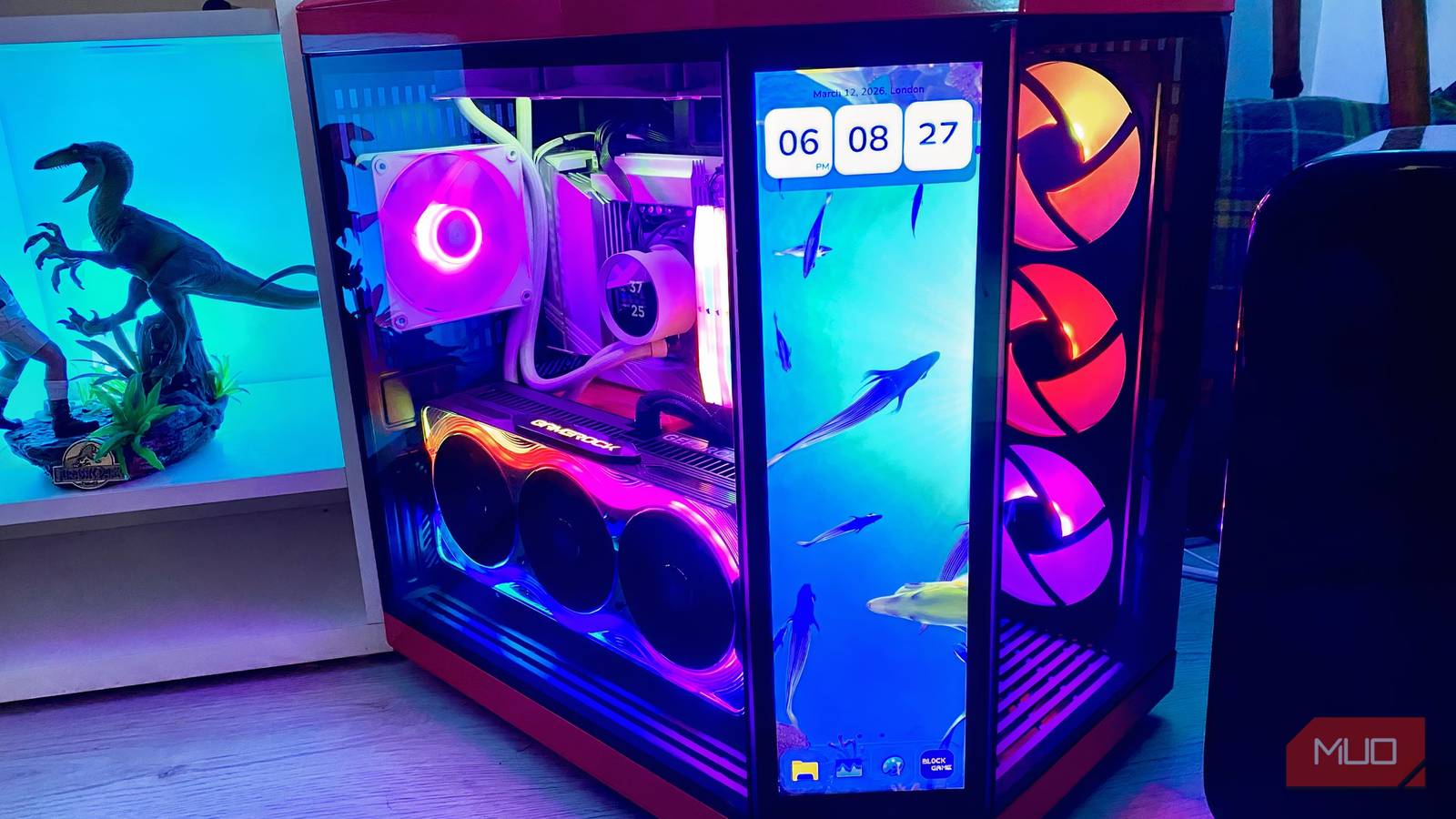
I own a very specific PC case. Like “ludicrously specific”. The Hyte Y70 Infinite Touch is the most eye-alluring mid-tower I’ve ever owned. It’s also the most stylistically challenging case I’ve assembled, both due to its built-in touchscreen and, more importantly, its awesome-looking vertical GPU mount. The latter, fairly unique feature has caused me to make a PC-building error, which temporarily negatively impacted my home-built rig’s airflow.
This being the first system I’ve ever put together with a vertically mounted graphics card, I regret not being a little more careful when setting up my latest Windows 11 PC. Because of the unique dimension demands of using a PCIe riser cable, I accidentally removed one of the rear PCIe brackets/slots from my case. And wouldn’t you know it? My desktop’s cooling has suffered as a result.
Do yourself a favor when building your next PC: don’t make the following crucial case mistake.

Why you shouldn’t remove a side panel from your PC
Be careful what components you displace from your rig’s case

I’ve made the error of removing more PCIe brackets than I should have done over the years with previous builds due to sheer ignorance. At one point, I figured that removing all the slots on the rear of my PC case would help improve airflow. In the vast majority of instances, that’s absolutely not the, well … case.
If you own a large-and-in-charge graphics card like my Palit GeForce RTX 5090 GameRock GPU, you’ll often have to remove at least two of the PCIe brackets from the rear of your rig. During the initial setup, when you’re reinstalling a motherboard, CPU, RAM, and GPU into a new case, it can be all too easy to accidentally remove more case slots than you should — especially if you’re connecting an additional device like a bespoke capture card.
The main reasons you shouldn’t take out more PC side slots from your build than absolutely necessary? Increased fan noise, potential degradation to various motherboard components, and probably most crucially, the risk of a lot more dust entering your precious rig.
Dust to dust
Cool to be kind in the right measure

For whatever reason you remove a PCIe bracket from the back of your case, whether it be by accident or for temporary cooling measures, it’s almost never going to improve your desktop’s long-term health.
Believe it or not, most PC case manufacturers (at least reputable ones) actually know what they’re doing. When you remove a component from your case you don’t need to, your system might suddenly become susceptible to unwanted issues.
The main problem that can arise from taking out PC case slots is increased dust build-up. Make no mistake, those brackets are there for a reason. Should you remove a slot that isn’t actively being used by a PCIe device connected to your motherboard, you’re going to most likely mess with the airflow paths inside your desktop’s case.

- Brand
-
Gigabyte
- GPU Speed
-
2.73 GHz
- Memory
-
16GB
The Gigabyte GeForce RTX 5080 is an Nvidia graphics card with 16GB of GDDR7 memory that supports DLSS 4 supersampling.
An open slot is going to court dust inside your PC’s crucial components like a drunk moth to the world’s most alluring flame. With open, unused ports on your PC, dust is likely to accumulate around your system’s fans and other crucial motherboard connections.
In my case, accidentally taking out a PCIe bracket quickly saw my RTX 5090 hoover up dust at an alarming rate. And I say this as someone who cleans the innards of his PC more than I do my kitchen countertops. Yes, my housekeeping skills suck. Feel free to judge.
Why you shouldn’t remove a side panel from your PC
Be careful what components you remove from your rig’s case

Though removing a PCIe slot can help with open-bench builds, generally speaking, you shouldn’t mess with rear slots that aren’t being used by your motherboard.
If you do, it can lead to less efficient fans, in turn leading to excess noise and increased temperatures that could have a detrimental effect on your PC’s most vital components. An open PCIe bracket also means your rig is more likely to suck up the inherent heat of the room it’s being used in, thus potentially having a higher chance of impacting GPU efficiency.
Exposing your rig to an open PCIe slot can negatively impact your graphics card, making it more vulnerable to dust and coil-whine. As someone who upgraded his PS5 Pro to a PC that cost more than my car due to said console’s distracting buzzing noise, I can’t tell you how much I appreciate a whisper-quiet gaming desktop.
If you want to improve airflow efficiency inside your system without resorting to the misguided option of removing a PCIe slot, you can either tweak BIOS settings to adjust fan curve levels or declutter your PC cables to improve cooling.
Putting together my current PC build was quite the head-scratcher. During a week of near-constant BSOD misery, I made the silly mistake of removing one of my PCIe brackets due to my exacting, super-sized, vertically-mounted GPU.
Though the components of my high-end rig mean I can power past the vast majority of performance issues, for the brief time I exposed my PC to added dust and less efficient airflow pathways, I certainly wasn’t helping my rig. Do yourself a favor when it comes to future builds: be more informed than I was when I last put together a mega PC.
