
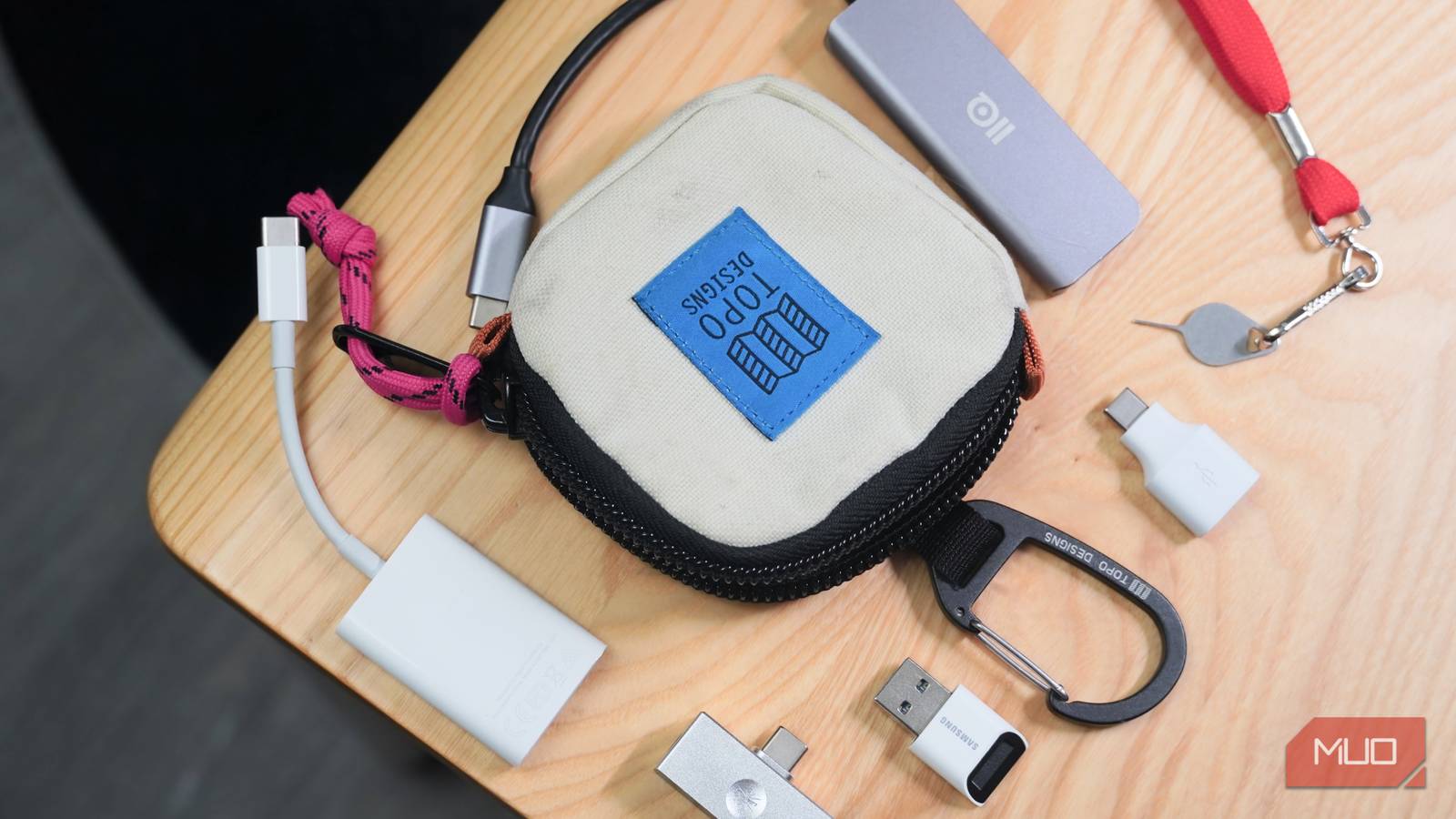
There’s nothing more frustrating than being out and about and needing some minor tech accessory you accidentally left at home. We’ve all done it, and for the sake of preparedness, I’d rather carry a small pouch with the essentials daily if it comes in clutch just one time. I’ve put together the perfect kit of crucial tech tools, and they all fit comfortably into a tiny pouch that can clip onto whatever tech bag you’re currently using.
The Topo Designs Square Bag is the centerpiece, and it stores accessories that let me connect to any USB device, swap SIM cards, read and write to SD cards, power external monitors, and more. The best part — more than half of these tools were free and included with other devices and accessories. You probably have a few of them in your tech junk drawer just waiting to be used, and the rest are quite affordable.
USB-C to A dongle
For connecting older devices to phones, tablets, laptops, and more

I’ve switched almost every part of my tech ecosystem to USB-C, down to the battery for my mirrorless camera. However, that doesn’t mean I never run into situations where I need one more USB-A or USB-C port. Luckily, there are small adapters that barely take up any space in your bag to prepare for this kind of situation. You probably know about the advantages of using a USB-C to USB-A adapter — this tiny tool can help you connect to chargers, peripherals, and accessories that still use the older USB connector.
That said, I actually find the USB-A to USB-C adapter to be more useful in the real world. Lots of infrastructure, whether it’s a charger on a plane or a data port on a library computer, still relies on USB-A. If you’ve completely switched over to USB-C cables like me, you won’t have any way to connect with these public ports without an adapter. Considering how small these adapters are, there’s no downside to throwing them in your kit. Check old phone or accessory boxes you might have for adapters like this one, because every one I own came for free with another product.
USB-C to 3.5mm DAC
Use wired headphones and experience true lossless streaming
I always like to carry a pair of wired earbuds as a fallback in case my wireless headphones run out of battery, or some unexpected connection issue occurs. Now that most phones don’t have a 3.5mm headphone jack onboard, you’ll need a USB-C to 3.5mm adapter to connect with wired headphones.
This is a great opportunity to invest in a USB-C digital-to-analog converter (DAC). These accessories deliver improved sound quality compared to your phone’s USB-C port or 3.5mm jack (if it has one). Aside from letting you connect to wired audio gear in a pinch, it’ll provide the extra power needed for you to take advantage of lossless audio streaming.

Lossless audio is pointless without these cheap Android accessories
Want to use Apple Music or Spotify’s lossless audio support? You’ll need some extra gear to make the most of it.
Switch SIM cards between devices and much more

I keep a SIM eject tool handy, and it’s way more useful than you might think. Sure, most people aren’t swapping SIMs regularly, but there are other use cases for this tool. If your phone or tablet supports microSD card expansion, you may need a SIM eject tool to install or swap out expandable storage cards. I have a niche use case for this tool — it’s used to remove the side straps of my Apple Vision Pro headset. Additionally, I use a SIM eject tool regularly to move SIM cards between my phone and my cellular tablet, which helps me avoid paying for another data plan.
Your use cases for a SIM eject tool probably won’t be the same as mine, but it’s another handy accessory that can’t hurt to keep around due to its compact size.
microSD and SD card reader
Pull dashcam footage, check camera contents, and play games

The days of microSD and full-size SD cards being exclusively for photographers and creatives are long gone. Almost everyone is using them in 2026, whether it’s to expand the storage of your phone or tablet, record dashcam footage in your car, enable your photography hobby, or store games on your Nintendo Switch or Steam Deck. The uses for compact, durable flash storage are nearly endless. But what if you need to access data from an SD card or microSD card on the go?
I ran into this problem firsthand when my partner was involved in a minor fender bender, and we realized we couldn’t recover the dashcam footage at the scene because we didn’t have the right dongle. That was all it took for me to see the value of keeping microSD and full-size SD card readers handy. Now, I keep them on-hand for all the reasons above, from loading up titles on my gaming handheld to transferring photos to my smartphone.
USB-C hub
When the first four tools don’t cut it, a versatile USB-C hub comes in

If you need to use a few of these USB accessories at once, a USB-C hub is crucial. I like to use expensive USB-C accessories for work, but the spare I keep in my bag is just a basic no-name unit I bought for $15 on Amazon. It connects to a host device over USB-C and provides a USB-C port, two USB-A ports, and an HDMI port.
Crucially, you can connect to monitors, meeting rooms, and TVs over HDMI as long as you have this tiny accessory in your bag. When I’m traveling and streaming services refuse to let me sign in on a hotel TV, I just plug this USB-C hub into my phone and mirror my screen for simplicity. It’s a lifesaver, and it really compliments all the other gizmos in this tech survival kit.
These tiny tools all fit in a small bag that goes with me everywhere

You don’t have to use the Topo Design Square Bag like I did, but having a small pouch that can easily be transferred between bags is ideal. I switch between tech backpacks, messenger bags, and sling bags on a weekly basis, and this tiny storage pouch lets me move the essentials seamlessly. While traveling, I’ll even clip the square bag onto my clothes, adding a wall adapter and USB-C cable — that way, I can charge, listen to music, and get work done without fumbling through my bag on trains and planes.
[ad_2]
Source link